




Aggiornamento software tramite USB.
Aggiornamento software alle versioni 4.76, 3.43 e 2.47
Acquista in download diretto.

Terms and Conditions

Dov'è il mio acquisto?

Return policy
Our Privacy Policy explains our principles when it comes to the collection, processing, and storage of your information. This policy specifically explains how we employ cookies, as well as the options you have to control them.
Cookies are small pieces of data, stored in text files that are stored on your computer or other device when websites are loaded in a browser. They are widely used to "remember" you and your preferences, either for a single visit or for multiple repeat visits
We use cookies for a number of different purposes. Some cookies are necessary for technical reasons; some enable a personalized experience for both visitors and registered users; and some allow the display of advertising from selected third party networks.
Visitors may wish to restrict the use of cookies or completely prevent them from being set. If you disable cookies, please be aware that some of the features of our service may not function correctly
We only collect information about you if we have a reason to do so-for example, to provide our services, to communicate with you, or to make our services better.
We are committed to maintaining the trust and confidence of our website visitors. We do not collect, sell, rent or trade email lists or any data with other companies and businesses. Have a look at our Privacy Policy page to read detail information on when and why we collect your personal information, how we use it, the limited conditions under which we may disclose it to others and how we keep it secure.
We may change Cookies and Privacy policy from time to time. This policy is effective from 24th May 2018.
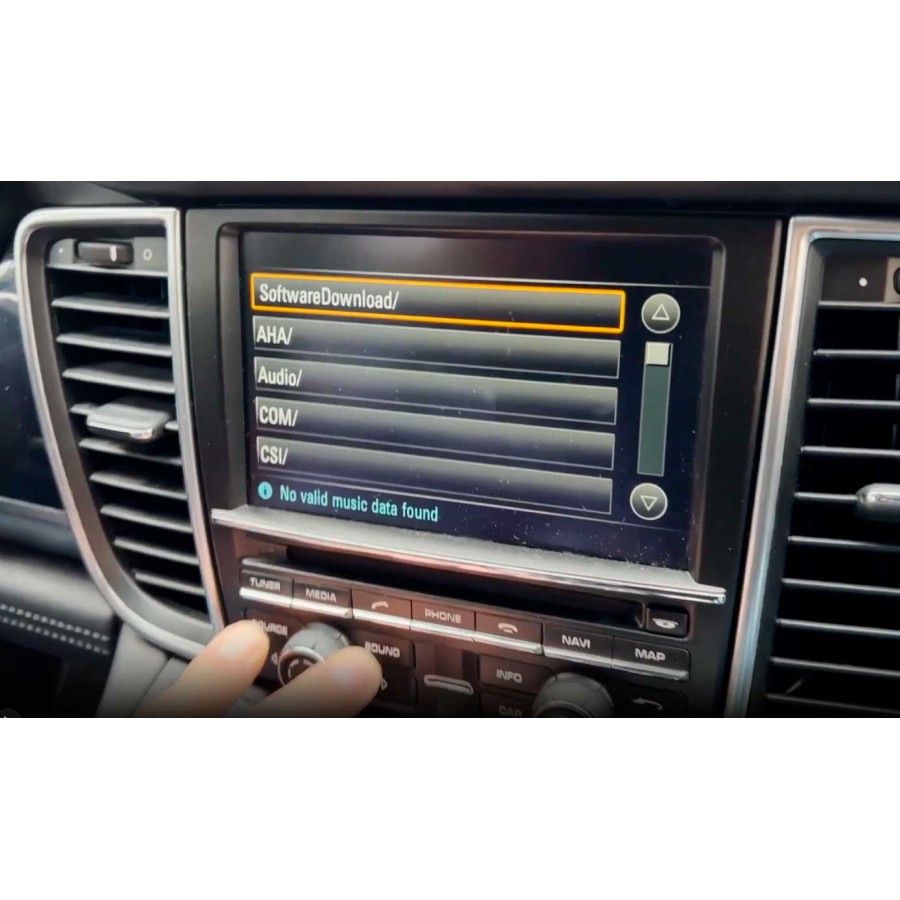
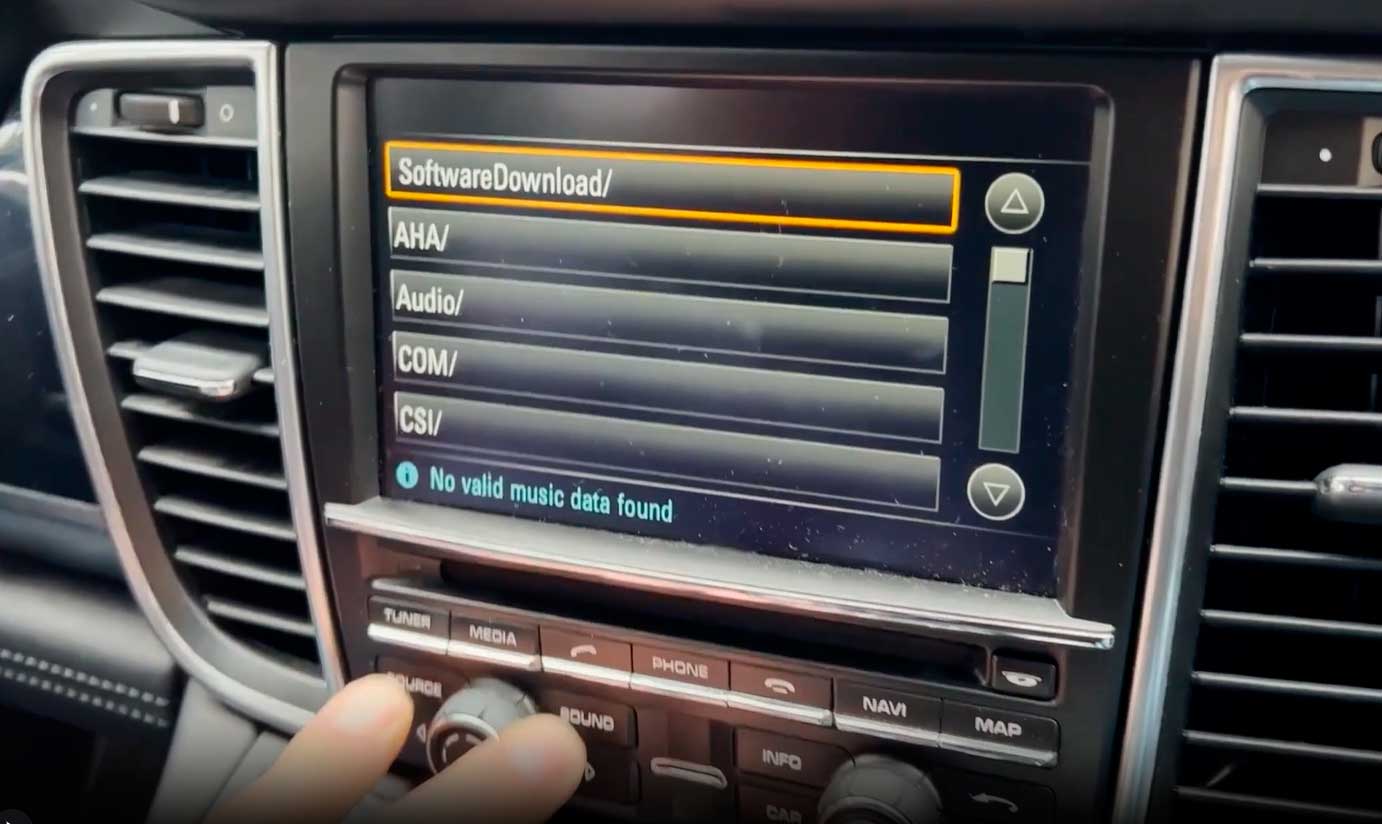
Per effettuare l'aggiornamento tramite USB, è necessario accedere al menu di ingegneria.
Puoi verificare se hai accesso al menu Ingegneria premendo contemporaneamente i pulsanti SOURCE + SOUND.
INFORMAZIONI.
Se hai la piattaforma 2.xx, la versione massima è 2.47.
Per la piattaforma 3.xx, la versione massima è 3.43.
Per la piattaforma 4.xx, la versione massima è 4.76.
Se hai la versione 2.xx o 3.xx non puoi aggiornare alla versione 4.76.
Consultazione senza impegno.
Aggiorna il tuo Porsche PCM 3.1 all'ultima versione. Risolve problemi di connettività Bluetooth, riavvii casuali, blocchi, ecc.
Compatibilità:
Aggiornamento USB. Verifica che la porta USB dell'auto riproduca file .mp3 (molti modelli non hanno la porta USB abilitata).
Verifica le nostre attivazioni via USB.
- Attivazione della funzione Bluetooth PCM 3.1
- Attivazione della funzione PCM 3.1 USB/AUX (UMS).
- PCM 3.1 DAB - Codice radio satellitare
- PCM 3.1 Video in movimento - TV gratuita
- PCM 3.1 Cronografo sportivo
- Registro del PCM 3.1
- Servizio in linea PCM 3.1
- Codice del menu Ingegneria PCM 3.1
- PCM 3.1 Codice di memoria individuale
- Immagine di avvio PCM 3.1
Additional Information.
How to Porsche PCM 3.1 Reset.
Credits:Champion Porsche
System version information hidden menu.
Credits: mx fix
Se hai domande, non esitare a chiedere, saremo felici di aiutarti.
Questo è un acquisto tramite download diretto. Riceverai le istruzioni al momento del pagamento.
Attivazione tramite memory stick USB PCM 3.1, non necessario PIWIS 2 o PIWIS 3 Diagnostics.
Acquisti con download diretto.
Al momento del pagamento riceverai una email con le istruzioni. Se non vedi l'e-mail nella cartella della posta, controlla la cartella dello spam.
Puoi accedere al tuo acquisto nel tuo Pannello Utente Web, nella Sezione I MIEI DOWNLOAD hai accesso ai tuoi acquisti.
Se hai problemi, non hai ricevuto la mail... non esitare a chiedere a info@euronavmaps.com
Spedizioni fisiche.
- I pacchi vengono generalmente spediti entro 24/48h. dopo aver ricevuto il pagamento e verranno spediti tramite TIPSA/CORREOS ESPAÑA con tracciabilità e consegna con firma. Ti forniremo un link per tracciare il tuo pacco online.
- Tutti i moduli vengono spediti testati, quindi solitamente la spedizione avviene entro 48 ore.
- Normalmente i clienti ricevono il pacco in 3-15 giorni. Ma a volte potrebbero esserci brevi ritardi.
- Le spese di spedizione comprendono le spese di movimentazione e imballaggio. Ti consigliamo di raggruppare i tuoi articoli in un unico ordine. Non possiamo raggruppare due ordini diversi effettuati separatamente e ad ognuno di essi verranno applicate le tariffe di spedizione. I tuoi articoli sono ben protetti.
Mancato rispetto del termine di consegna.
Se non ricevi i prodotti entro 30 giorni, o entro il termine concordato, devi avvisare il venditore.
Se allo scadere di questo periodo il venditore non ti ha ancora consegnato il prodotto, hai diritto alla risoluzione del contratto o al rimborso. Per maggiori informazioni leggi la normativa europea su spedizioni e resi.
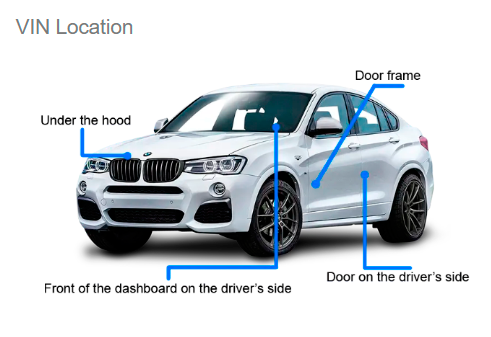
Cos'è il VIN? Il numero di identificazione del veicolo è il numero di identificazione dell'auto. È il numero di telaio dell'auto.
Il VIN si trova sulla targhetta VIN situata appena sotto il parabrezza. Il VIN si trova anche sull'etichetta sul telaio della portiera lato conducente e sui documenti relativi alla registrazione, al titolo e all'assicurazione del veicolo.
La garanzia dell'auto viene persa quando si installano adattatori Carplay/Android?
La procedura di installazione dell'adattatore è molto semplice. La connessione è di tipo Plug&Play senza la necessità di tagliare alcun cavo originale. Pertanto inizialmente non vi è alcun rischio di perdere la garanzia.
Telefoni iPhone compatibili con CARPLAY.
Controlla qui, https://www.apple.com/es/ios/carplay/available-models/
Quali telefoni Android sono compatibili con Android Auto.
Controlla qui, https://www.android.com/intl/es_es/auto/compatibility/#compatibility-vehicles
Acquisti con download diretto.
Per gli acquisti tramite download diretto si consiglia di utilizzare computer con sistema operativo Windows. Se sei un utente Mac, è importante contattarci prima di effettuare l'acquisto.
Per gli acquisti tramite download diretto è richiesta una minima conoscenza nell'uso del computer, nello scaricamento e nella decompressione dei file... È semplice, ma non tutte le persone sanno come farlo.
Si consiglia di utilizzare una scheda USB o SD di buona qualità.
L'utilizzo di una scheda USB o SD di scarsa qualità può influenzare gli errori nel processo di aggiornamento dell'unità.
Utilizzare una scheda USB o SD di buona qualità, ad esempio la marca Kingston.
Si consiglia di utilizzare lo strumento gratuito 7Zip per decomprimere i file scaricati. https://www.7-zip.org/
Le spedizioni vengono effettuate in 1/24h. Come regola generale viene inviato in 1/6h.
- I prodotti virtuali non sono rimborsabili una volta acquistati. Se non accetti questa condizione, ti preghiamo di non effettuare l'ordine.
- Offriamo assistenza da remoto, ma tale assistenza non è disponibile per i prodotti virtuali a meno che non venga richiesta specificamente in anticipo. Se non accetti questa condizione, ti preghiamo di non effettuare l'ordine.
Spedizione fisica.
Le spedizioni vengono inviate entro 24/48 ore, normalmente vengono inviate entro 24 ore.
I tempi di consegna dipendono dal paese di destinazione, ad esempio Francia, Germania, Italia, solitamente consegna in 3/7 giorni lavorativi.
Per Spagna e Portogallo consegna in 1/5 giorni lavorativi.
Per Paesi Bassi, Danimarca, Svizzera, Svezia... solitamente consegna in 3/10 giorni lavorativi.
Informazioni sulle versioni delle mappe.
Tieni presente che la versione di navigazione non corrisponde alla versione delle mappe. Per esempio. Scheda SD Connetti. La versione esce nel 2022, ma i dati cartografici corrispondono al primo trimestre del 2020. Realizzare mappe richiede tempo, tienilo presente.
Cos'è un prodotto OEM?
I prodotti OEM (Original Equipment Manufacturer) sono articoli fabbricati.
Un produttore di apparecchiature originali, OEM è un'azienda che produce e vende prodotti o parti di un prodotto che qualsiasi azienda vende ai propri clienti.
Spedizione e resi.
Leggi le politiche di spedizione e reso.
Disclaimer:
Ciò che vedi qui è fornito da produttori, fornitori e altri. La confezione e il materiale del prodotto possono contenere informazioni diverse fornite sul sito web, inclusa la descrizione del prodotto.
Consultare prima dell'acquisto.
Se hai domande sulla scelta del tuo acquisto, non esitare a chiedere, saremo felici di aiutarti.
Avvertimento.
L'esecuzione della procedura di installazione di Carplay/Box interfaccia Android può causare danni permanenti alla tua auto. Fai questo a tuo rischio! Non siamo responsabili per eventuali perdite o danni.
Tutti i marchi e i loghi riprodotti su questo sito sono di proprietà dei rispettivi proprietari. Non sono responsabili della vendita dei prodotti in vendita su questo sito. Non siamo autorizzati ad agire come distributore o rappresentante ufficiale. Siamo specialisti indipendenti, non facciamo parte dei produttori riprodotti su questo sito.
Apple e iPhone sono marchi di Apple Inc., registrati negli Stati Uniti e in altri paesi. Apple CarPlay è un marchio registrato di Apple Inc.
Android, Android Auto, Google Maps, Google Assistant sono marchi di Google LLC.
Vantaggi dell'acquisto su EURONAVMAPS.COM
- Consulenza personalizzata; Un eccellente servizio clienti può aiutarti a scegliere il prodotto più adatto alle tue esigenze.
- Assistenza post-vendita; In caso di problemi con il software o la sua installazione, avere a disposizione un'attrezzatura accessibile può essere molto utile.
- Fiducia e sicurezza; La tranquillità di sapere di effettuare un acquisto in un ambiente sicuro aumenta la soddisfazione del cliente.
Orari di apertura dell'ufficio/officina.
Dal lunedì al giovedì: dalle 8:00 alle 13:00 e dalle 16:00 alle 19:00 (GMT+1).
Venerdì: dalle 8:00 alle 14:00 (GMT+1).
Orari dell'officina: dal lunedì al venerdì, dalle 8:00 alle 18:00 (GMT+1).
Sabato e domenica: chiuso.
Aggiornamento software tramite USB.
Aggiornamento software alle versioni 4.76, 3.43 e 2.47
Acquista in download diretto.
